
Summary
1. Best communication practices
To motivate employees to respond to the Employee Survey, it is important to:
- Highlight the benefits for them: they receive a personalized analysis of their professional carbon footprint and they contribute to your company’s carbon footprint assessment, and thus to your broader emissions reduction efforts.
- Address their concerns:
- The Employee Survey is anonymous: you cannot access their responses; you only know whether they participated or not.
- The Employee Survey is quick: it takes 5 minutes to complete if they have no trips to report, and 10 minutes if they do.
2. Retrieve the sharing link for the Employee Survey
- Open your ongoing collection → Employee Survey
- Copy the link
3. Share the Employee Survey via email
Email template
Subject: Participate in our carbon footprint assessment 🌱
Hello everyone,
This year, we are committed to calculating our carbon footprint to take concrete action and reduce our emissions. And you can help!
Why your participation matters
Your responses to this short and anonymous survey (⏱️ 5-10 min max) allow us to:
- Provide you with a personalized analysis of your own professional footprint.
- Precisely measure the impact of our activities (travel, meals, digital use, waste).
- Identify concrete actions to reduce our collective footprint.
➡️ Complete my survey [link to the survey] (to be completed by July 1, 2026)
What you need to know:
🔒 100% anonymous: your responses are aggregated and will never be viewed individually.
📧 No spam: your email is only used to avoid unnecessary reminders.
🌱 Direct impact: the more of us who respond, the more accurate our carbon footprint will be, and the more effective our actions!
Thank you for your commitment! 🙏
PS: Feel free to reply to this email if you have any questions.
4. Share the Employee Survey with printed materials (poster, flyer)
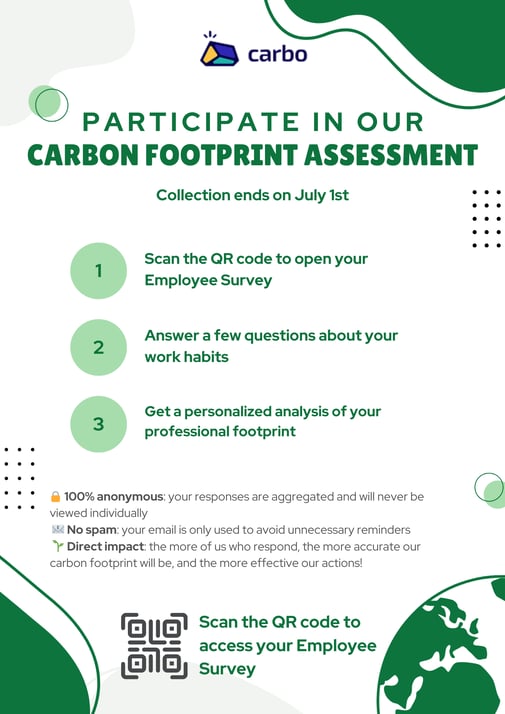
Displaying printed materials can help you get more responses to the Employee Survey, especially if employees do not have access to a professional email address or a computer at work.
You can create posters or flyers by including the QR code that allows them to access it via their mobile phones.
💡The camera on most recent smartphones can directly scan QR codes. If this is not the case for your employees, they can download a free app (e.g., QR Code Scanner).
Example poster
➡️ Use a free template on Canva
5. Have employees complete the survey on a shared computer
If some employees do not have access to an individual computer or a mobile phone at work, you can organize dedicated sessions on a shared computer.
How to proceed?
- Inform employees about the available time slots and the location of the shared computer.
- Ask them to open the Employee Survey link in private browsing mode (incognito) to ensure the confidentiality of their responses.
- Why? Without this mode, responses will overwrite those of the previous user.
Example process
- The first employee opens the link in private browsing, completes the survey, and closes the window.
- The second employee reopens the link in private browsing, fills out their own responses, and so on.
6. Remind employees effectively
Haven't reached the 50% participation required for validation? Remind your employees!- Download respondents' information
- Remind those who haven't started their survey: remove all emails listed in the file from your mailing list. Send a specific reminder: "Participate in our assessment by answering a short survey... X people have already participated!"
- Remind those who haven't completed it: copy the list of emails with the status "completed = no". Send a specific reminder: "Just a few more questions to access your professional carbon footprint!"
You now have all the tools to successfully collect maximum responses from employees. Happy collecting!